NEEM AUB CONTACT MET MIJ OP

* Verplichte velden

Email field is invalid

  • Login
  • Demo
  • ⓘ Controleer de belkosten
  • Contacteer ons
    • Functies
    • Vlootactiviteiten
    • Uw oplossing aanpassen
    • Bedrijf
  • Bedrijf
    • Bedrijf
    • Frotcom wereldwijd
    • Over ons
    • Word partner
    • Carrières
    • Blog
    • Word partner
    • Carrières
    • Frotcom wereldwijd
    • Kenniscentrum
    • Help Center
Nederlands
Menu Menu
  • Login
Nederlands
search
    • Blog
    • Word partner
    • Carrières
    • Frotcom wereldwijd
    • Kenniscentrum
    • Help Center
Frotcom Intelligent Fleets Frotcom Intelligent Fleets
call charge
Contacteer ons
PROBEER DEMO
    • Functies
    • Vlootactiviteiten
    • Uw oplossing aanpassen
    • Bedrijf
    • Voertuigtracking en sensorbewaking
    • Rijgedrag analyse
    • Controle van rijtijden
    • Personeelsbeheer
    • Downloaden van tachograaf op afstand
    • Toegangsbeheer
    • Brandstofbeheer
    • Routeplanning en -monitoring
    • Automatische bestuurdersidentificatie
    • Ontdek alle functies
    • Hoe we de noden van elke vlootactiviteit oplossen
    • Besparingscalculator
Blog

How to zoom, locate and review information on Frotcom graphs

Mon, 16/04/2018 - 10:46
Tips & Inzichten
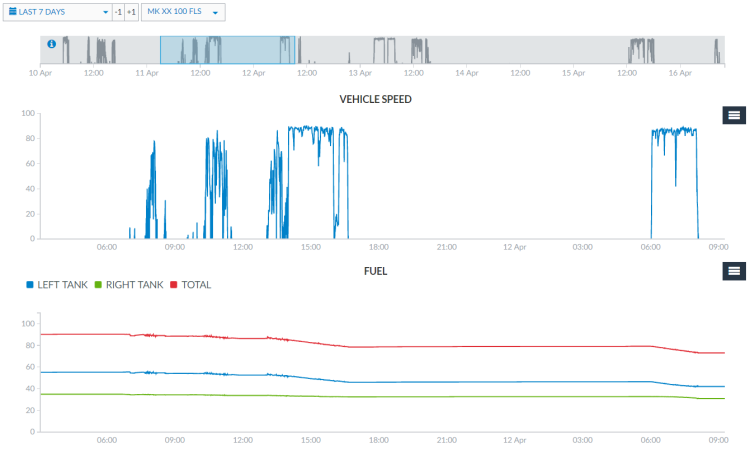
You can now zoom your Frotcom Graphs in a user-friendly way to locate and review information about your fleet.

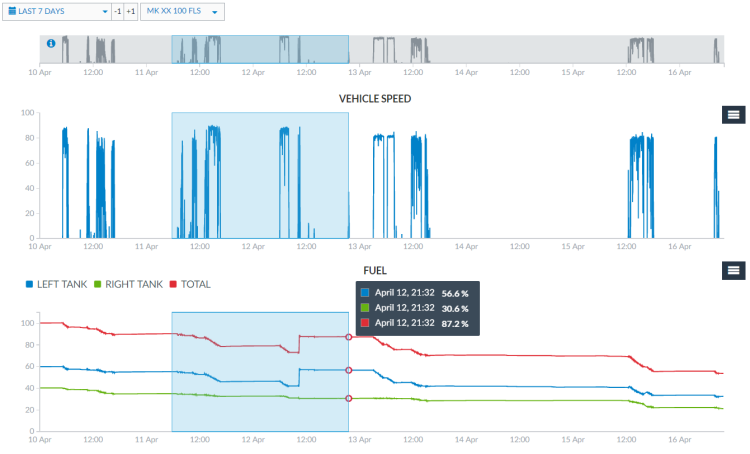
Using the grey bar at the top of the Graphs view, or from inside any of the graphs, you can drag and drop a line in which you want to have the zoom in for all the graphs.

Drag and drop the grey bar on top of the Graphs view:
Zoom graphs - Drag and drop the grey bar on top of Graphs view

 
Drag and drop inside the graph:
Zoom graphs - Drag and drop inside the graph

 
Clicking again on the grey area of the bar, it zooms out the graphs to the default view.

Zoom out the graphs to the default view


Note: be sure to drag the line precisely on the grey bar or on a graph area - dragging outside these limits will lead the browser to only select the text instead of zooming in.
Post tags:
  • Frotcom
  • Frotcom Help Center
  • Frotcom graphs
  • Intelligent fleets
  • Fleet management systeem

Meer van de Blog

CAN Bus Reports in Frotcom: The Intelligent Way to Manage Mixed-Energy Fleets
How Rising Fuel Costs Are Reshaping Fleet Strategy in 2026
Flexible Fleet Tracking with the Frotcom Driver App
Data-Driven Strategies to Optimize Your Fleet’s Fuel Management
Frotcom Strengthens Global Presence at Leading Transport and Logistics Events

Schrijf in voor de newsletter en voor het laatste nieuws

Schrijf je in voor onze nieuwsbrief

VANUIT ONS KENNISCENTRUM

Case Studie
Maverik Trans verbetert de zichtbaarheid en verlaagt de kosten met 10% dankzij Frotcom
Case Studie
E.A.L Man Hin & Sons verbetert de rapportage op locatie met Frotcom
Documentatie
Integratie met KRONE
Documentatie
Video telematica
Documentatie
Plug & Play voertuigtracking en onderhoud

Deel dit

Delen op Facebook
Delen op Twitter
Delen op LinkedIn
Delen per e-mail
Product
    • Functies
    • Vloot-activiteiten
    • Uw oplossing aanpassen
    • Oplossingen
    • Integraties
    • Kenniscentrum
    • FAQS
    • Besparings Calculator
    • Help Center
Bedrijf
    • Frotcom wereldwijd
    • Over ons
    • Word partner
    • Carrières
    • Gebeurtenissen
    • Blog
Het laatste nieuws in onze blog
24 Jun 2026
How Automation and Electrification Are Changing Fleet Management
19 Jun 2026
Summer Increases Pressure on Fleets and Quickly Exposes Inefficiencies
12 Jun 2026
The Silent Profit Killers: Hidden Fleet Costs You Can’t Afford to Ignore
Contacteer ons

Email field is invalid

* Verplichte velden

Lees het laatste nieuws in uw e-mail
Schrijf je in voor onze nieuwsbrief
Volg ons
  • Facebook
  • Twitter
  • Linkedin
  • Instragram
  • Youtube
  • Pinterest
Prijzen & erkenningen
    • Gold Microsoft Partner
    • PME Líder
    • PME Excelência
    • IT Mark
    • ISO
    • Inovadora Cotec
    • Reconhecimento Idoneidade I&D
  • © 2026 Frotcom International
  • Algemene voorwaarden
  • Over Cookies
  • Kwaliteitsbeleid
  • Privacybeleid
  • Informatie over gegevensbescherming
Choose your language
  • Български
  • Deutsch
  • English
  • Español
  • Ελληνικά
  • Français
  • Italiano
  • Македонски
  • Nederlands
  • Português
  • Română
  • Shqip
  • Slovenščina
  • Srpski
  • Svenska