ŽELIM DA ME POKLICETE

* Obvezna polja.

Email field is invalid

  • Login
  • Demo
  • ⓘ Preverite stroške klicev
  • Pišite nam
    • Funkcije
    • Aktivnosti flote
    • Prilagodite svojo rešitev
    • Podjetje
  • Podjetje
    • Podjetje
    • Frotcom po svetu
    • O nas
    • Postanite partner
    • Zaposlitev
    • Blog
    • Postanite partner
    • Zaposlitev
    • Frotcom po svetu
    • Center znanja
    • Help Center
Slovenščina
Meni Meni
  • Login
Slovenščina
išči
    • Blog
    • Postanite partner
    • Zaposlitev
    • Frotcom po svetu
    • Center znanja
    • Help Center
Frotcom Intelligent Fleets Frotcom Intelligent Fleets
call charge
Pišite nam
PREIZLUSI DEMO
    • Funkcije
    • Aktivnosti flote
    • Prilagodite svojo rešitev
    • Podjetje
    • Sledenje vozil in spremljanje senzorjev
    • Analiza vedenja med vožnjo
    • Spremljanje voznih časov
    • Upravljanje delovne sile
    • Oddaljen prenos podatkov iz tahografa
    • Nadzor nad dostopom
    • Upravljanje porabe goriva
    • Načrtovanje in spremljanje poti
    • Samodejno prepoznavanje voznika
    • Odkrijte vse funkcije
    • Kako bomo rešili vse potrebe dejavnosti flote
    • Izračun prihrankov
Blog

How to zoom, locate and review information on Frotcom graphs

Pon, 16/04/2018 - 10:46
Nasveti in perspektive
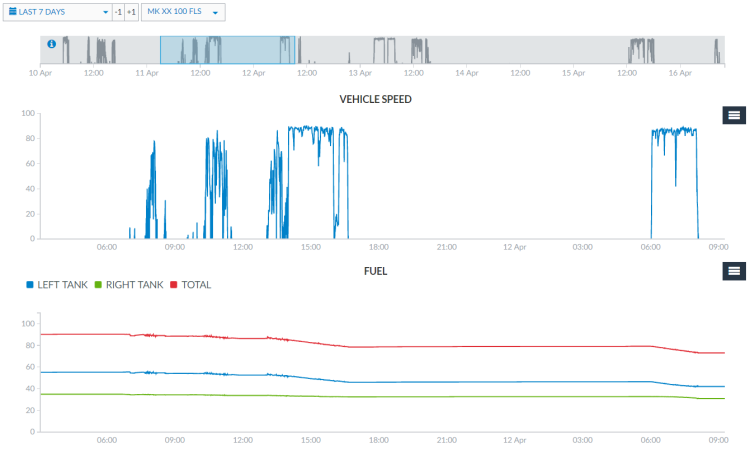
You can now zoom your Frotcom Graphs in a user-friendly way to locate and review information about your fleet.

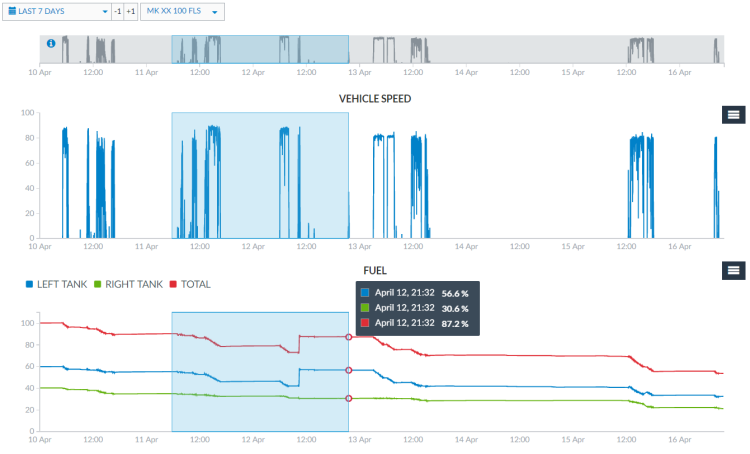
Using the grey bar at the top of the Graphs view, or from inside any of the graphs, you can drag and drop a line in which you want to have the zoom in for all the graphs.

Drag and drop the grey bar on top of the Graphs view:
Zoom graphs - Drag and drop the grey bar on top of Graphs view

 
Drag and drop inside the graph:
Zoom graphs - Drag and drop inside the graph

 
Clicking again on the grey area of the bar, it zooms out the graphs to the default view.

Zoom out the graphs to the default view


Note: be sure to drag the line precisely on the grey bar or on a graph area - dragging outside these limits will lead the browser to only select the text instead of zooming in.
Post tags:
  • Frotcom
  • Frotcom Help Center
  • Frotcom graphs
  • Intelligent fleets
  • Fleet management system

Več z bloga

Data-Driven Strategies to Optimize Your Fleet’s Fuel Management
Frotcom Strengthens Global Presence at Leading Transport and Logistics Events
How a Flexible Powertrain Strategy Improves Fleet Management
Driving Times Monitoring with Smart Tachograph in Frotcom’s Vehicle Infobox
Fleet Management Software: A Must-Have Tool for 2025

Naročite se in prejemajte najnovejše novice

Naročite se na naše novice

Iz našega centra znanja

Dokumentacija
Integracija s KRONE
Dokumentacija
Sledenje in vzdrževanje vozil Plug & Play
Dokumentacija
Vzdrževanje vozil
Dokumentacija
Integracija s Schmitz Cargobull
Dokumentacija
Sledenje vozil in spremljanje senzorjev

Delite

Share on Facebook
Share on Twitter
Share on LinkedIn
Share by Email
Produkt
    • Funkcije
    • Aktivnosti flote
    • Prilagodite svojo rešitev
    • Rešitve
    • Integrations
    • Center znanja
    • FAQS
    • Izračun prihrankov
    • Help Center
Podjetje
    • Frotcom po svetu
    • O nas
    • Postanite partner
    • Zaposlitev
    • Dogodke
    • Blog
Zadnje novice bloga
13 Mar 2026
Fleet Risk Management: Identify Your Most Dangerous Assets
9 Mar 2026
Maverik Trans Improves Visibility and Cuts Costs by 10% with Frotcom
6 Mar 2026
Women Empowering the Trucking Industry
Pišite nam

Email field is invalid

* Obvezna polja.

Prebereite zadnje novice na vašem mailu
Naročite se na naše novice
Sledite nam
  • Facebook
  • Twitter
  • Linkedin
  • Instragram
  • Youtube
  • Pinterest
Nagrade in priznanja
    • Gold Microsoft Partner
    • PME Líder
    • PME Excelência
    • IT Mark
    • ISO
    • Inovadora Cotec
    • Reconhecimento Idoneidade I&D
  • © 2026 Frotcom International
  • Pogoji
  • About Cookies
  • Politika Kakovosti
  • Pravilnik o Zasebnosti
  • O Varstvu Podatkov
Choose your language
  • Български
  • Deutsch
  • English
  • Español
  • Ελληνικά
  • Français
  • Italiano
  • Македонски
  • Nederlands
  • Português
  • Română
  • Shqip
  • Slovenščina
  • Srpski
  • Svenska