BITTE KONTAKTIEREN SIE MICH

* Pflichtfelder

Email field is invalid

  • Login
  • Demo
  • ⓘ Gesprächsgebühren prüfen
  • Kontaktieren Sie uns
    • Funktionen
    • Flottenaktivitäten
    • Massgeschneiderte Lösung
    • Unternehmen
  • Unternehmen
    • Unternehmen
    • Frotcom weltweit
    • Über uns
    • Werden sie partner
    • Karriere
    • Blog
    • Werden Sie Partner
    • Karriere
    • Frotcom weltweit
    • Knowledge Center
    • Help Center
Deutsch
Menü Menü
  • Login
Deutsch
Suchen
    • Blog
    • Werden Sie Partner
    • Karriere
    • Frotcom weltweit
    • Knowledge Center
    • Help Center
Frotcom Intelligent Fleets Frotcom Intelligent Fleets
call charge
Kontaktieren Sie uns
DEMO VERSION
    • Funktionen
    • Flottenaktivitäten
    • Massgeschneiderte Lösung
    • Unternehmen
    • Vehicle tracking and sensor monitoring
    • Driving behavior analysis
    • Driving times monitoring
    • Workforce management
    • Remote Tacho Download
    • Access control
    • Fuel management
    • Route planning and monitoring
    • Automatic driver identification
    • Entdecken Sie alle Funktionen
    • How we solve each fleet activity needs
    • Ersparnis Rechner
Blog

How to zoom, locate and review information on Frotcom graphs

Mo, 16/04/2018 - 10:46
Tipps & Perspektiven
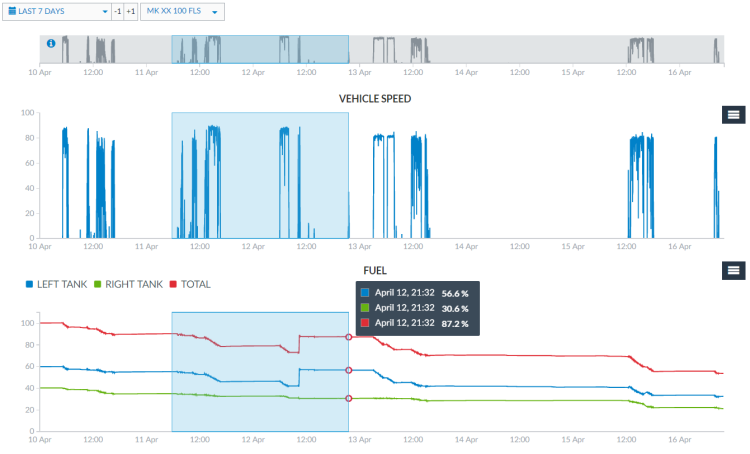
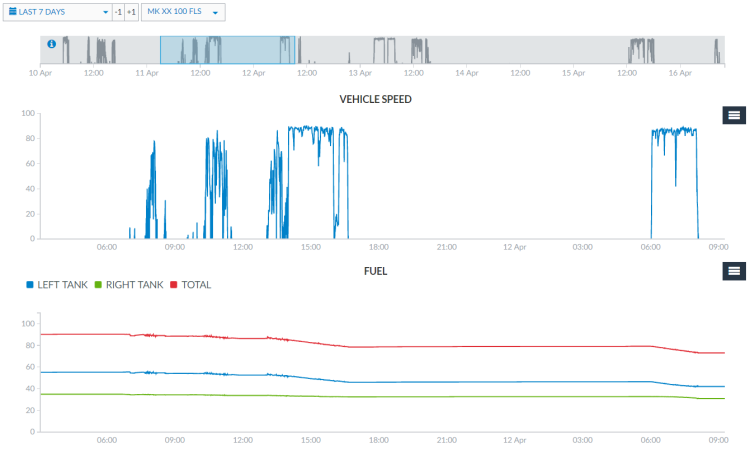
You can now zoom your Frotcom Graphs in a user-friendly way to locate and review information about your fleet.

Using the grey bar at the top of the Graphs view, or from inside any of the graphs, you can drag and drop a line in which you want to have the zoom in for all the graphs.

Drag and drop the grey bar on top of the Graphs view:
Zoom graphs - Drag and drop the grey bar on top of Graphs view

 
Drag and drop inside the graph:
Zoom graphs - Drag and drop inside the graph

 
Clicking again on the grey area of the bar, it zooms out the graphs to the default view.

Zoom out the graphs to the default view


Note: be sure to drag the line precisely on the grey bar or on a graph area - dragging outside these limits will lead the browser to only select the text instead of zooming in.
Post tags:
  • Frotcom
  • Frotcom Help Center
  • Frotcom graphs
  • Intelligente Flotten
  • Flottenmanagementsystem

Mehr aus dem Blog

Frotcom Strengthens Global Presence at Leading Transport and Logistics Events
How a Flexible Powertrain Strategy Improves Fleet Management
Driving Times Monitoring with Smart Tachograph in Frotcom’s Vehicle Infobox
Fleet Management Software: A Must-Have Tool for 2025
Frotcom's Notebook module now includes a new document preview feature

Abonnieren Sie unseren Newsletter, um die neuesten Nachrichten zu erhalten

Newsletter bestellen

AUS UNSEREM KNOWLEDGE CENTER

Dokumentation
Video-Telematik
Dokumentation
Das elektronische Fahrtenbuch
Dokumentation
Integration mit ContiConnect Pressure Check
Fallstudie
SMC Joint Venture reduziert den Krafstoffverbrauch mit Frotcom
Fallstudie
Agro Food Industrie steigert die Produktivität seiner Flotte dank Frotcom.

Aktie

Auf Facebook teilen
Auf Twitter teilen
Auf LinkedIn teilen
Über E-Mail teilen
Produkt
    • Funktionen
    • Flottenaktivitäten
    • Maßgeschneiderte Lösung für Sie
    • Lösungen
    • Integrationen
    • Knowledge Center
    • FAQS
    • Ersparnis Rechner
    • Help Center
Unternehmen
    • Frotcom weltweit
    • Über uns
    • Werden Sie Partner
    • Karriere
    • Veranstaltungen
    • Blog
Neuigkeiten in unserem Blog
5 Jan 2026
How Frotcom Can Drive Your Fleet to Its 2026 Goals
29 Dez 2025
Fleet Management Challenges in 2026: 5 Errors to Avoid
22 Dez 2025
How Video Telematics Can Reduce Your Fleet Costs
Kontaktieren Sie uns

Email field is invalid

* Pflichtfelder

Lesen Sie alle Neuigkeiten in Ihren Emails
Newsletter bestellen
Folgen Sie uns auf
  • Facebook
  • Twitter
  • Linkedin
  • Instragram
  • Youtube
  • Pinterest
Auszeichnungen
    • Gold Microsoft Partner
    • PME Líder
    • PME Excelência
    • IT Mark
    • ISO
    • Inovadora Cotec
    • Reconhecimento Idoneidade I&D
  • © 2026 Frotcom International
  • Nutzungsbedingungen
  • Cookie Richtlinien
  • Qualitätspolitik
  • Datenschutzbestimmungen
  • Über Datenschutz
Choose your language
  • Български
  • Deutsch
  • English
  • Español
  • Ελληνικά
  • Français
  • Italiano
  • Македонски
  • Nederlands
  • Português
  • Română
  • Shqip
  • Slovenščina
  • Srpski
  • Svenska