I WISH TO BE CONTACTED

* Mandatory fields

Email field is invalid

  • Login
  • Demo
  • ⓘ Check call charges
  • Contact us
    • Features
    • Fleet Activities
    • Customize your solution
    • Company
  • Company
    • Company
    • Frotcom worldwide
    • About us
    • Become a partner
    • Careers
    • Blog
    • Become a partner
    • Careers
    • Frotcom worldwide
    • Knowledge Center
    • Help Center
English
Menu Menu
  • Login
English
search
    • Blog
    • Become a partner
    • Careers
    • Frotcom worldwide
    • Knowledge Center
    • Help Center
Frotcom Intelligent Fleets Frotcom Intelligent Fleets
call charge
Contact us
Try demo
    • Features
    • Fleet Activities
    • Customize your solution
    • Company
    • Vehicle tracking and sensor monitoring
    • Driving behavior analysis
    • Driving times monitoring
    • Workforce management
    • Remote tachograph download
    • Access control
    • Fuel management
    • Route planning and monitoring
    • Automatic driver identification
    • Discover all features
    • How we solve each fleet activity needs
    • Savings calculator
Blog

Set up activity update notifications in Frotcom Workforce management Tasks

Fri, 08/03/2019 - 10:41
Tips & Perspectives

You can now set up notifications to receive alerts when new steps in the workflow are reached (e.g. Started, Moving to the destination, Arrived at destination, etc.), in the Tasks* being executed. These notifications can be sent to emails and mobile phones.

To configure these notifications, you must go to Administration > Account - Jobs and choose all the task types and corresponding steps that will trigger notifications to users via emails or texts to their mobile phones.
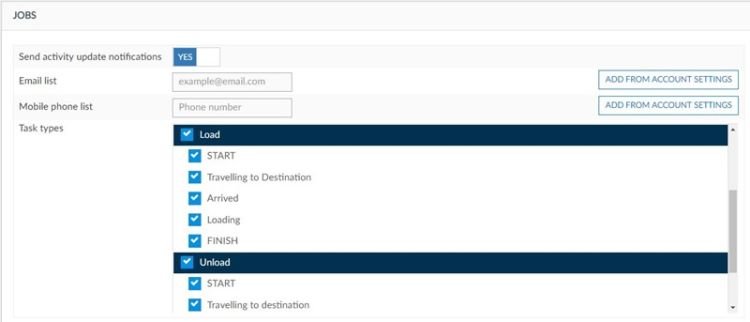
Set up activity update notifications in Frotcom Workforce management Tasks

 
* Tasks are the way the office sends work orders to drivers, services or freight, depending on the company's activity. When a driver receives a new task, he/she can either accept it or reject it.

Post tags:
  • Tip of the month
  • Frotcom notifications
  • Frotcom tasks
  • Mobile workforce management
  • Fleet management system
  • GPS vehicle tracking
  • Intelligent fleets

More from the blog

CAN Bus Reports in Frotcom: The Intelligent Way to Manage Mixed-Energy Fleets
How Rising Fuel Costs Are Reshaping Fleet Strategy in 2026
Flexible Fleet Tracking with the Frotcom Driver App
Data-Driven Strategies to Optimize Your Fleet’s Fuel Management
Frotcom Strengthens Global Presence at Leading Transport and Logistics Events

Subscribe our newsletter to get the latest news

Subscribe our newsletter

From our knowledge center

Case Study
OREYAFRICA Cuts Fleet Costs by 13% and Takes Control of Route Compliance with Frotcom
Case Study
Papin Sport Improves Rental and Assistance with Frotcom
Case Study
Maverik Trans Improves Visibility and Cuts Costs by 10% with Frotcom
Case Study
E.A.L Man Hin & Sons Improves Field Reporting with Frotcom
Case Study
K-Log Achieves Fleet and Sustainability Goals with Frotcom

Share this

Share on Facebook
Share on Twitter
Share on LinkedIn
Share by Email
Product
    • Features
    • Fleet Activities
    • Customize Your Solution
    • Solutions
    • Integrations
    • Knowledge Center
    • FAQS
    • Savings Calculator
    • Help Center
Company
    • Frotcom worldwide
    • About us
    • Become a partner
    • Careers
    • Events
    • Blog
The latest in our blog
25 May 2026
CAN Bus Reports in Frotcom: The Intelligent Way to Manage Mixed-Energy Fleets
20 May 2026
How Rising Fuel Costs Are Reshaping Fleet Strategy in 2026
14 May 2026
Frotcom at Trade Transport Show 2026
Contact us

Email field is invalid

* Mandatory fields

Read the latest on your email
Subscribe our newsletter
Follow us
  • Facebook
  • Twitter
  • Linkedin
  • Instragram
  • Youtube
  • Pinterest
Awards & recognitions
    • Gold Microsoft Partner
    • PME Líder
    • PME Excelência
    • IT Mark
    • ISO
    • Inovadora Cotec
    • Reconhecimento Idoneidade I&D
  • © 2026 Frotcom International
  • Terms and Conditions
  • About Cookies
  • Quality Policy
  • Privacy Policy
  • About Data Protection
Choose your language
  • Български
  • Deutsch
  • English
  • Español
  • Ελληνικά
  • Français
  • Italiano
  • Македонски
  • Nederlands
  • Português
  • Română
  • Shqip
  • Slovenščina
  • Srpski
  • Svenska